
Pinora · A sticky-notes app for the Mac
Coming soonNotes that live on your desk.
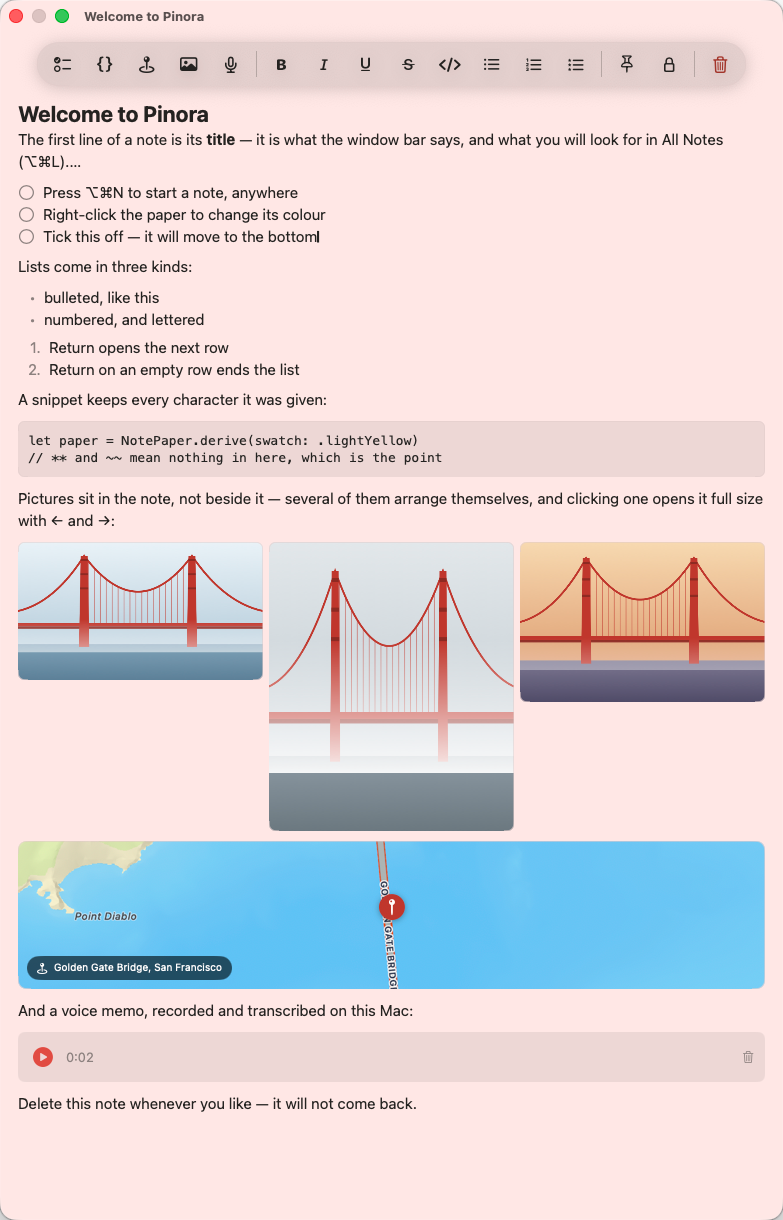
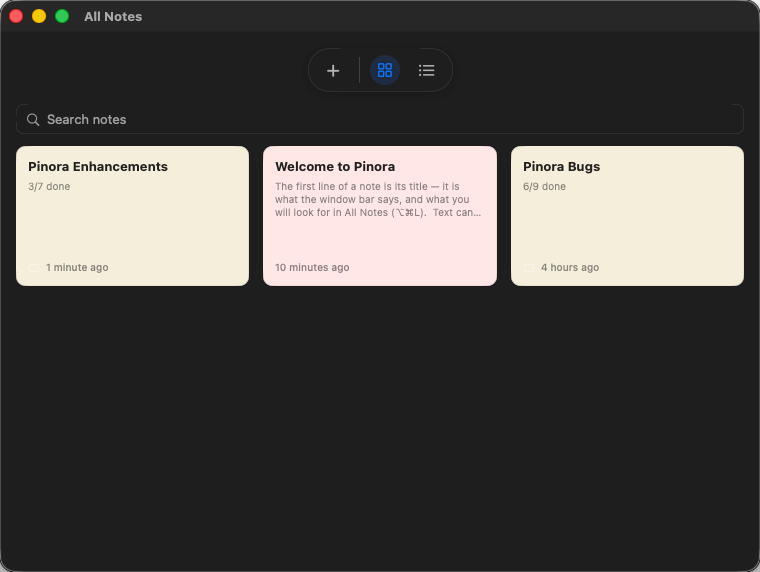
Every note is its own floating window, and every note is a real document. Checklists you tick. Photos in a collage. A voice memo, transcribed. A place, with its map. Type #tag and the note files itself.
macOS 15+ · Free for 3 notes · $12.99 once for everything · No account, no cloud
A desk of notes. Diagram, not a screenshot.
Every note app makes you choose.
Classic stickies
Always there, and they can't hold much. No checklist you can tick, no voice memo, no code that survives pasting.
Note databases
Hold everything, inside an app you have to go open. A note you have to remember to look at isn't a sticky.
Seven kinds of block. One kind of note.
- Textbold, italic, underline, strikethrough, inline code
- Checkliststick a row and it sinks to the bottom; Tab nests it under the one above
- Listsbullet, numbered or lettered; reorder and they renumber themselves
- Codemonospaced, fixed-pitch families only, and
**means nothing inside it - Photosa masonry collage with a full-size viewer; paste straight from the clipboard
- Voicerecorded in place, transcribed entirely on your Mac
- Placesa live map preview, one click through to Maps
Set a reminder on any note: type @remind where you are writing, or click the bell. Lead times from a minute to a day before, repeating daily, weekly, monthly or yearly.
Rich, without the noise.
The toolbar belongs to the note you are using. It fades in on focus, out when you leave, so nine notes on screen is one toolbar, not nine.
Eighteen tools ride in a capsule that sits outside the note, attached to whichever edge you choose and floating a set distance off the window, so none of the writing space goes to chrome. It resizes with the note, so a small note gets a small capsule. Push a note against the side of the display and the capsule flips to the opposite edge rather than falling off screen.
Double-click the title bar and a note rolls up to a strip you can still identify. A note's title is its first line, so "Untitled" cannot exist.
It behaves like furniture.
Float a single note above every app, or set the rule once for all of them: nothing on top, the note you used last, the note you edited last, or every note. Switch Spaces and your notes come with you, because a sticky belongs to the desk, not to a Space. Quit, restart, log back in: every note is where you left it, and the ones you closed yourself stay closed. Organise all notes (⌥⌘O) tiles every open note across the screen when the desk gets untidy. Close an empty note and it quietly deletes itself.
Built by measuring, not eyeballing.
35 paper colours — 20 vivid hues plus five shades each of white, light yellow and black — every one run through a WCAG contrast check, so the ink you read is measured legible rather than eyeballed. Body text takes any family installed on your Mac; code blocks are restricted to fixed-pitch families only. Undo is one stack per note, and ⌘Z brings the photo back, actually.
General
Open at login. Reopen the notes that were on screen when you quit. Spell-check that underlines as you type, never rewrites what you wrote, and leaves code blocks alone.
Toolbar
Park it on any edge of the note — top, bottom, left or right — and set how far off the window it floats, one point to ten.
Note windows
Drop the shadow, square off the corners, pick one of four title-bar transparencies, and nudge the checklist indent until nested boxes line up under the row above.
Backup
Hourly or daily, into any folder — including an iCloud Drive, OneDrive or Google Drive folder, so the file leaves the Mac by a service you already use. Keep 1, 3, 5, 10, 25 or all.
Twenty-one languages, each shown in its own name
So you can find yours before you can read the screen. Choosing one restarts Pinora, and nothing else about your notes changes.
Your notes never leave your Mac.
No account. No analytics. No telemetry. No cloud. Pinora's sandbox entitlements are five lines long, and the only network access is fetching map tiles for a place you added. Voice transcription runs entirely on-device. One switch keeps your notes out of screen sharing, recordings and screenshots. Pinora registers exactly three global key combinations and no more, so it never asks for Accessibility permission. This isn't a policy, it is how the app is built, and you can check.
com.apple.security.app-sandbox                     = true
com.apple.security.network.client                  = true
com.apple.security.device.audio-input              = true
com.apple.security.files.user-selected.read-write  = true
com.apple.security.print                           = true
One thing it does keep: an identity
Pinora makes a fixed identifier for this install once, with a signing keypair beside it. Nothing reads it, nothing sends it, and it never touches a note you write — it is groundwork for sharing notes with other people later on. The private key is shown only after Touch ID or your Mac password, every time you ask, and you can regenerate the pair whenever you want.
One price, once.
Does it sync? Is there an iPhone app?
No, by design. Pinora has no server, no account and no cloud. That is why there is no subscription, and why "your notes never leave your Mac" is literally true. If your notes must be on your phone, Pinora is honestly not your app; Apple Notes is free and syncs.
Can I get my notes out?
Yes. Export to Markdown or plain text, and a one-file backup of everything, whenever you want. Automatic scheduled backups go to any folder you choose, including an iCloud Drive, OneDrive or Google Drive folder.
Why is the only network access map tiles?
A place block shows a map preview, and map images have to come from a map service. That request contains coordinates for the place you added, never your note text. Delete the location block and Pinora makes no network requests at all.
Can I lock a note?
Yes, and it is real encryption rather than a curtain. A locked note's text, pictures and voice memos are all sealed. Touch ID unlocks it instantly, you can give it a cover name while it is locked, and it re-locks itself after a delay you set — and always when the Mac sleeps. Forget the password and Touch ID or your Mac login password can stand in while you set a new one.
Does it import from Apple Stickies?
No. I looked at it seriously and decided against it.
What is the catch?
$12.99 once. Free updates through v1. One developer, 190 tests, nothing to cancel.
Put a real note on your desk.
Coming soonmacOS 15+, Apple silicon and Intel · Free for 3 notes · $12.99 once